
Google Search CTR
Search your keyword and click your organic result.
Create campaignChoose Desktop CTR or Mobile CTR for each campaign, then set your keywords, target location and daily search count. Control which links are clicked and how long each visit stays.
Creating an account is free.
Pay for results, not failures. Desktop CTR visit: 2 credits · Mobile CTR visit: 4 credits · Technical failure before landing: 0 credits.
One credit balance covers every campaign type and both delivery devices, across all your websites and keywords.
Search your keyword and click your organic result.
Create campaignSearch Bing for your keyword and click your organic result.
Create campaignFind your business listing and click its website link.
Create campaignFind your website in the overview and click its source link.
Create campaignSet up daily campaigns, see every visit with proof, and track positions every time.
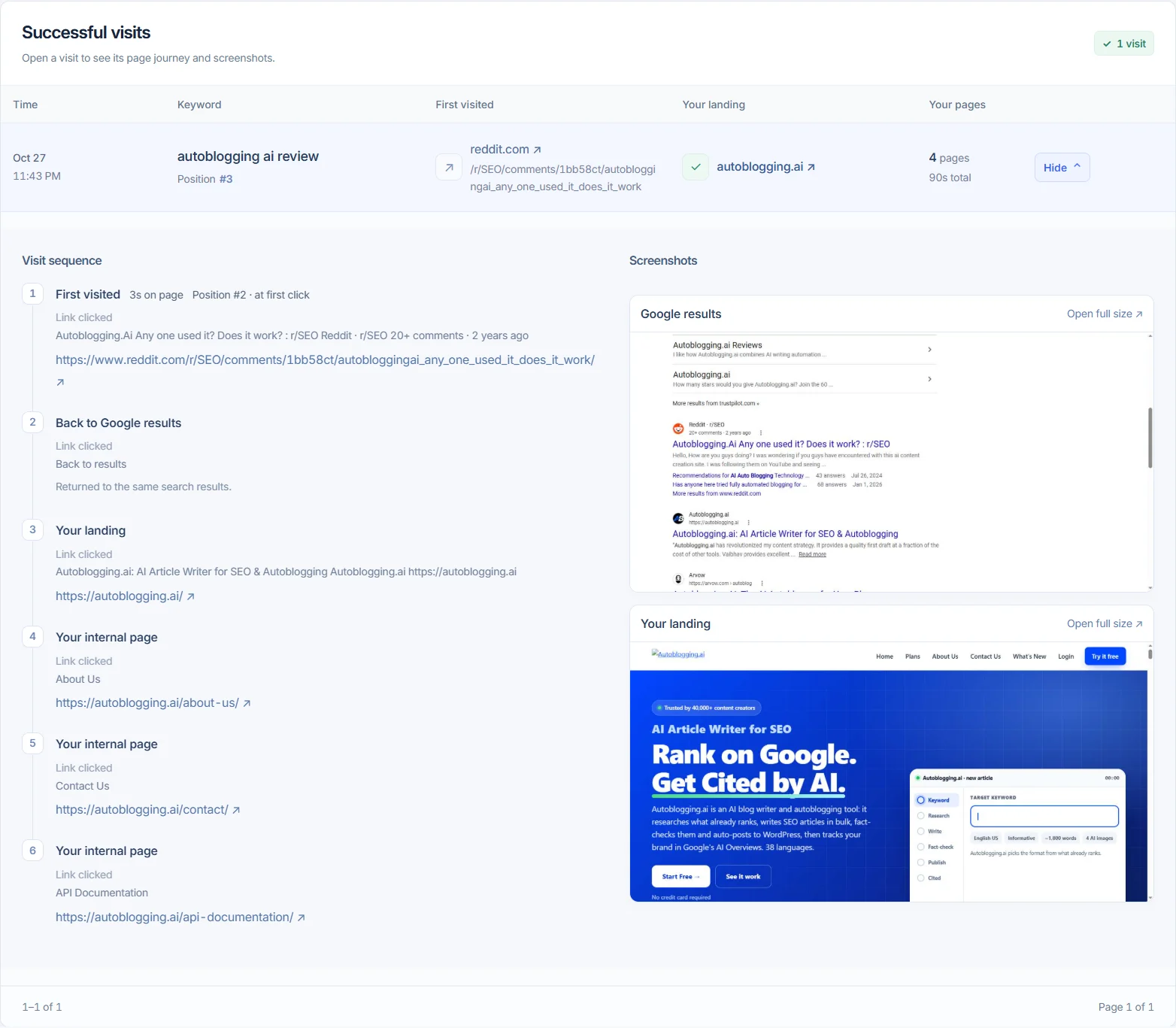
A recorded visit with the actual search and landing screenshots. View full size ↗
See the first site, return to results, your landing and each internal page.
View Google results and your confirmed landing as separate proof images.
Compare verified Search positions, Maps listing order and AI citation order.
Set the target page, internal links, visit duration and click order. Each campaign report includes search results, visited pages and screenshot previews.
Add up to 100 keywords per campaign. Choose a country and optionally a state and city, or select Any country to use a mix of supported locations.
Set a daily number of searches, send them now through the queue, spread them out, or set a gap. Choose days, hours and a time zone. Daily goals reset at 00:00 UTC.
Set the target URL, internal page URLs and link text. Choose the click order and scrolling time. Each visit can include up to five additional pages and lasts up to five minutes in total.
example.com//services//pricing/Reports show measured searches, positions, website visits and screenshots. A verified search without a match uses 1 credit; technical interruptions before the website opens use no credits.
Desktop Chrome windows and real Android phone sessions, matched to your target location through managed proxy routes.
Simple monthly plans. One credit balance covers Google Search, Bing Search, Maps, AI Overviews, Desktop CTR and Mobile CTR.
$59/month
2,000 credits a month
Up to 1,000 Desktop CTR visits or 500 Mobile CTR visits
Choose Starter$125/month
5,000 credits a month
Up to 2,500 Desktop CTR visits or 1,250 Mobile CTR visits
Choose Growth$399/month
20,000 credits a month
Up to 10,000 Desktop CTR visits or 5,000 Mobile CTR visits
Choose Scale$699/month
40,000 credits a month
Up to 20,000 Desktop CTR visits or 10,000 Mobile CTR visits
Choose AgencyA confirmed Desktop CTR visit uses 2 credits even if a later internal step stops. Mobile CTR uses exactly 2× credits because it reserves a real Android phone session. Unused credits roll over while your subscription is active.
Pick Desktop CTR or Mobile CTR, then Google Search, Bing Search, Maps or AI Overviews. Add your keywords and daily searches, and review every visit with proof.
Create campaign →Your page must appear within the top 100 organic results for your chosen keyword and location. Choose a search depth up to 100 results. Maps campaigns check up to 50 listings (about five pages). AI Overview campaigns need a matching source link. A verified search without a match uses 1 credit. Technical interruptions before the website opens use no credits.
Yes. Set a daily number of searches, send them now through the queue, spread them out, or set a gap. You can also choose days, hours and a time zone. Daily goals reset at 00:00 UTC.
Set the target URL, internal page URLs and link text. Optionally visit a qualifying result above yours first, then go back and open your target. Choose the click order and scrolling time. Each visit can include up to five additional pages and lasts up to five minutes in total.
Choose a country and optionally a state and city. Select Any country to use a mix of supported locations. Visits that cannot verify the requested location use no credits.
Yes. One balance covers all campaigns, with up to 100 campaigns and 100 keywords per campaign. Unused credits roll over while the subscription is active and expire when cancellation takes effect.
No. These are automated visits. Reports show measured searches, positions, website visits and screenshots; they do not guarantee rankings, leads or sales.
Contact support with your website and required steps. Custom development has a separate, agreed one-time fee. Campaign visits still use your regular plan credits.