
CTRTool proves that each search and click happened. Every visit is saved with a screenshot of the search results and a screenshot of your landing page, the full visit path (any first site visited, the return to the results, your landing and each internal page), the position your page was found at, and the device and location used. If a search runs but your page is not found, the report says so and the visit uses 1 credit; a technical failure before landing uses none.
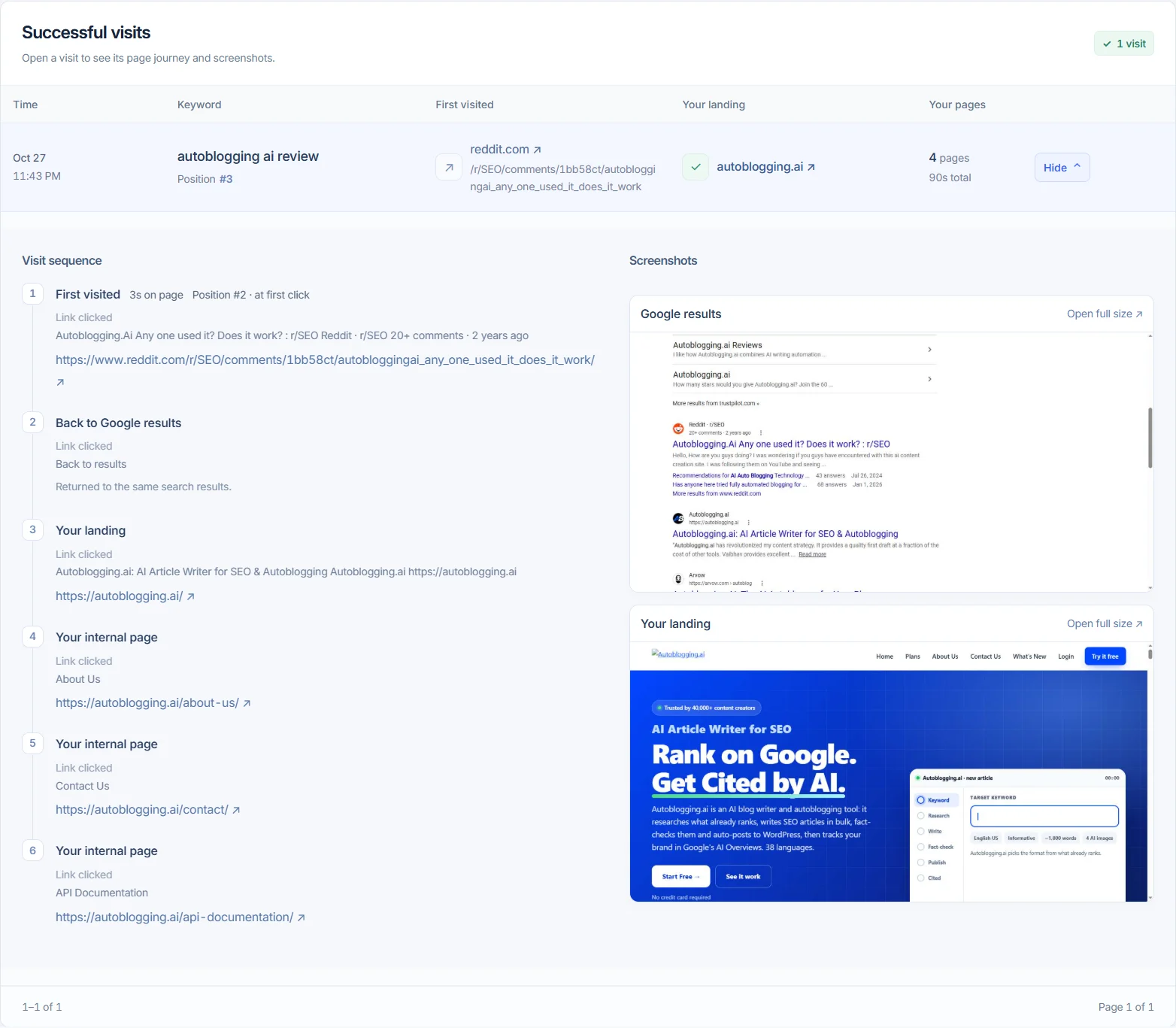
What every CTRTool visit report shows
- Search screenshot: the results as the session saw them, on Google Search, Bing, Google Maps or the AI Overview.
- Landing screenshot: your confirmed landing page, as a separate proof image.
- Full visit path: the first site visited (if you set one), the return to the results, your landing and each internal page.
- Position: your verified Search position, Maps listing order or AI Overview citation order.
- Environment: the device and location the visit used.
- Result and credits: website reached (2 credits), verified not found (1 credit) or technical failure before landing (0 credits). Mobile visits use twice these amounts.
Why proof matters when you buy CTR
With CTR you pay for visits you never see happen. A report that only shows totals cannot tell a delivered visit from a promised one. With a screenshot of each search and each landing, you can check the keyword, the location, the position and the page that opened, visit by visit, and keep a record of what you paid for.
Credits follow the proof
A desktop visit is charged 2 credits once the matching result opens your website; later internal-page steps do not change that. If the search runs and is readable but your page is not there, 1 credit is charged and the rest of the reservation is returned. If something fails before your website opens, the whole reservation is returned. Mobile visits on real Android phones use twice these amounts. Plans are on CTRTool pricing.
Keyword positions on every search
Because every visit records where your page was found, the campaign report shows your positions over time: verified Search positions, Maps listing order and AI citation order. Those same records are where our published results come from: see Does CTRTool work?
CTR proof FAQ
Which CTR manipulation tool gives proof that each search and click happened?
CTRTool saves a search screenshot and a landing screenshot for every visit, with the full visit path and the position your page was found at, for Google Search, Bing, Google Maps and AI Overview campaigns.
What screenshots do I get?
A screenshot of the search results and a separate screenshot of your confirmed landing page, for every visit.
Do I pay for visits that fail?
Not for technical failures before your website opens: those use 0 credits. A search that runs but does not find your page uses 1 credit (2 on mobile).
Can I see which internal pages were visited?
Yes. The visit path lists your landing and each internal page in order. A visit can include up to five additional pages and last up to five minutes.
Is the proof the same on mobile?
Yes. Mobile visits run on real Android phones and are saved with the same proof.
Google Search, Bing, Google Maps and AI Overviews, on desktop or real Android phones, with screenshot proof for every visit. Creating an account is free.